More on Retrieval-Augmented Generation (RAG)
In the previous RAG lecture, we saw how combining retrieval with a language model can produce more accurate, context-specific responses. In this follow-up, we dig deeper: we’ll unpack the main architectural components of a full-featured RAG system, understand why and how documents are processed before retrieval, explore more advanced retrieval paradigms (like graph-based RAG), and survey modern frameworks that make building RAG systems easier.
By the end of this module, students should be able to:
Understand each component in a RAG pipeline;
Learn preprocessing for your documents (splitting, chunking, embedding, indexing);
Recognize when to use vector-based or graph-based retrieval;
Use frameworks to build maintainable, extensible RAG applications;
RAG Examples
Healthcare and Research Assistants
Query medical literature and summarize latest research papers.
Retrieve treatment guidelines from proprietary clinical data.
Customer Support Chatbots
Pull answers from company documentation or ticket history.
Use retrieved context to generate accurate and personalized support responses.
Enterprise Knowledge Assistants
Access internal wikis, design docs, and project repositories.
Help employees query domain-specific knowledge without searching manually.
Legal Document Analysis
Extract relevant clauses from long contracts.
Generate summaries and answer compliance-related questions.
Code Assistants
Answer questions using project-specific codebases and API docs.
Help developers with accurate debugging suggestions based on the repository.
Core Components of a RAG System
RAG empowers an LLM to produce grounded, context-aware responses by pulling in information from outside sources. This is made possible through a set of architectural components that operate together in a defined workflow. Let’s take a closer look at each compoment.
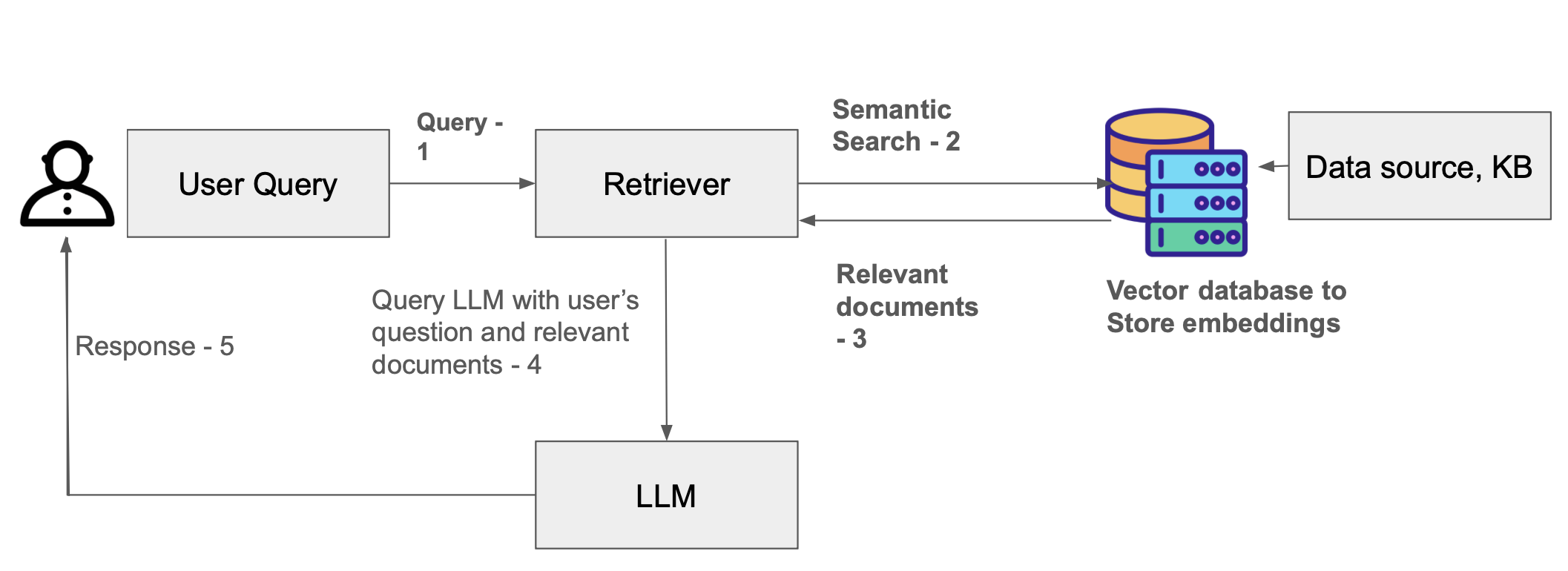
RAG workflow diagram.
In this RAG workflow, the user submits a query, which is first sent to a retriever. The retriever performs a semantic search over a vector database containing embeddings generated from the knowledge base. It returns the most relevant documents to the retriever, which then sends both the user’s original question and the retrieved documents to the LLM. The LLM uses this combined context to generate an informed response, which is finally delivered back to the user.
Data sources and Knowledge base
The knowledge base can contain both structured and unstructured data. It could be in the form of CSV files with rows and columns, or it could be text documents such as PDF or HTML files. You can also connect your knowledge base to streaming data sources or APIs. The documents in a knowlege base be preprocessed and converted to embeddings for the retrieval to work efficiently.
A raw document (e.g., a long PDF, research paper, book chapter) may be thousands of words — far
exceeding what a LLM can reasonably handle at once. If you treat entire documents as single units,
retrieval will likely retrieve entire documents — which are large, and may contain a lot of
irrelevant data, hiding the pertinent details. Instead, if you divide documents into smaller,
semantically coherent chunks of text (e.g. 500–2,000 characters, or number-of-sentences), then
retrieval returns just a handful of chunks relevant to the query. This improves both precision
(less irrelevant text) and efficiency (fewer tokens, faster inference) of the LLM’s generated
response. Thus, document splitting or chunking is fundamental to making RAG practical,
scalable, and precise. Note that each LLM has a context window size (8K, 32K, 128K, etc.) and let's say for a book with
70K words the amount of token is approximately 100K.
In the last lecture, we used several Tapis code generation snippets as documents and generated
embeddings for them. In this section, we will learn how to split these documents into smaller
chunks by grouping sentences into fixed-size token blocks, preparing them for more efficient
retrieval and RAG processing. Note we are not doing tokenizer-based chunking here. You can use AutoTokenizer from transformer to do that.
This example simply shows chunking based on the word limit.
def chunk_text_words(texts, max_tokens=20):
    if isinstance(texts, str):
        texts = [texts]

    all_chunks = []
    for text in texts:
        words = text.split()
        for i in range(0, len(words), max_tokens):
            chunk = " ".join(words[i:i+max_tokens])
            all_chunks.append(chunk)
    return all_chunks

    # Apply to documents
all_chunks = chunk_text_words(tapis_documents, max_tokens=20)
for i, c in enumerate(all_chunks, 1):
    print(f"Chunk {i} ({len(c.split())} words): {c}\n")
This code will break long sentences into chunks of 20 words.
Chunk 1 (20 words): Tapis is an NSF-funded web-based API framework for securely managing computational workloads across infrastructure and institutions, so that experts can

Chunk 2 (12 words): focus on their research instead of the technology needed to accomplish it.

Chunk 3 (20 words): As part of work funded by the National Science Foundation starting in 2019, Tapis is delivering a version 3 (“v3”)

Chunk 4 (20 words): of its platform with several new capabilities, including a multi-site Security Kernel, Streaming Data APIs, and first-class support for containerized

Chunk 5 (1 words): applications.

Chunk 6 (12 words): Python code for generating a Tapis token: from tapipy.tapis import Tapis ...
The output shows a list of text chunks generated.
Embeddings (Vectorization)
Now that we have created chunks of fixed length, we will create embeddings for each chunk. Embeddings are the backbone of retrieval. Each chunk is turned into a numerical vector (an embedding) capturing its semantic meaning in a given context.
You will have to pre-pull the embedding model nomic-embed-text by exec-ing into the Ollama container and running a command
olama pull nomic-embed-text
When you pull any embedding model (or any model) with Ollama, the model comes packaged with a Manifest file (called a Modelfile) that describes how Ollama should load and run the model.
ollama show --modelfile nomic-embed-text
The code below generates an embedding vector for a given text chunk using a local Ollama API. This embedding can then be used in a RAG system for semantic search or retrieval.
import requests
import numpy as np

def embed_with_ollama(text, model="nomic-embed-text"):
    """
    Generate embeddings for a text chunk using Ollama local API.
    Ollama must be running on localhost:11434.
    """
    url = "http://172.17.0.1:11434/api/embed"
    payload = {
        "model": model,
        "input": text
    }

    response = requests.post(url, json=payload)
    response.raise_for_status() # raises exception if request is not successful
    data = response.json()  #  Python dict

    # Access embeddings directly
    return np.array(data["embeddings"][0])  # single embedding vector
Next, to view chunks and its associated embedding you can use the code below
def process_document_for_rag(text, chunk_size=100, embedding_model="nomic-embed-text"):
    """
    1. Chunk the document
    2. Generate embeddings for each chunk
    3. Return a list of dicts: {"chunk": text, "embedding": vector}
    """
    chunks = chunk_text_words(text, max_tokens=chunk_size)
    embedded_chunks = []

    for chunk in chunks:
        emb = embed_with_ollama(chunk, model=embedding_model)
        embedded_chunks.append({
            "chunk": chunk,
            "embedding": emb
        })

    return embedded_chunks
if __name__ == "__main__":
tapis_documents = [
"Tapis is an NSF-funded web-based API framework for securely managing computational workloads across infrastructure and institutions, so that experts can focus on their research instead of the technology needed to accomplish it.",
"As part of work funded by the National Science Foundation starting in 2019, Tapis is delivering a version 3 (“v3”) of its platform with several new capabilities, including a multi-site Security Kernel, Streaming Data APIs, and first-class support for containerized applications.",
"Python code for generating a Tapis token: from tapipy.tapis import Tapis ...",  # shortened for example
]
rag_chunks = []

for doc in tapis_documents:
    chunks = process_document_for_rag(doc, chunk_size=20)
    rag_chunks.extend(chunks)

for i, c in enumerate(rag_chunks):
    print(f"Chunk {i+1}:\n{c['chunk']}\nEmbedding: {(c['embedding'])}\n")
Index / Vector Store
These embeddings are then stored in a specialized database called a vector store or embedding index, that can supporting efficient similarity queries (nearest neighbors, etc.). This enables rapid retrieval of relevant chunks given a query. Some of the popular vector stores are ChromaDB, Neo4j, FAISS (Facebook AI Similarity Search). Neo4j is a graph database but can be combined with vector search for knowledge graph + embedding queries. We will see a short demo on this.
Key points about vector store are as follows:
Similarity Search: Vector stores perform operations like cosine similarity, Euclidean distance, or dot product to find the closest embeddings to a given query vector.
Scalability: They are optimized for handling millions or even billions of vectors efficiently.
Persistence: Most vector stores can persist embeddings on disk and support incremental updates.
User Query
An input provided by the user can be in various formats such as text, image, code, or other modalities.
The user’s query typically triggers two main processes:
Retrieval: Fetching relevant context or information from a knowledge base, vector store, or database.
Generation: Producing a response using an LLM or other generative model, often conditioned on the retrieved context.
Retriever
When the user sends a query, the query text is first converted into an embedding vector using the same embedding model used for your documents. Then the retriever queries the vector database, using this query embedding to find the most similar document embeddings stored in the DB. Usually, similarity is measured with cosine similarity, Euclidean distance, or other metrics. Top K results are returned to the retriver.
LLM (Generator)
The model (e.g., GPT-style or other LLM) receives the user query along with the relevant context retrieved from the vector store. Using this combined prompt, the LLM generates a context-aware response.
Note
When do we use Vector-based RAG vs Graph-based RAG?
Vector-based RAG works best for searching through large amounts of unstructured data like documents or code. For example, a system that answers questions from a company’s knowledge base uses vector search to find relevant passages quickly. Graph-based RAG is better when connections between pieces of information matter, allowing reasoning across linked data—for instance, a biomedical knowledge graph that finds relationships between drugs, genes, and diseases.
Graph-based RAG (Graph RAG)
While the classical RAG pipeline (documents → split → embed → vector store → retrieve → LLM) works for many tasks, there are scenarios where more sophisticated retrieval / knowledge integration approaches are beneficial.
Graph RAG involves representing knowledge not just as isolated chunks, but as nodes and edges — e.g., entities, relationships, concepts — forming a knowledge graph. Retrieval then becomes graph traversal and semantic search rather than just nearest-neighbor in vector space. This is especially useful when your data is structured, relational, or has complex interdependencies (e.g., medical records, relational databases, multimodal data, or domains where relationships matter as much as entities). Graph RAG can help with context coherence, relational reasoning, and reduce hallucinations by grounding answers in structured relationships rather than free-text chunks.
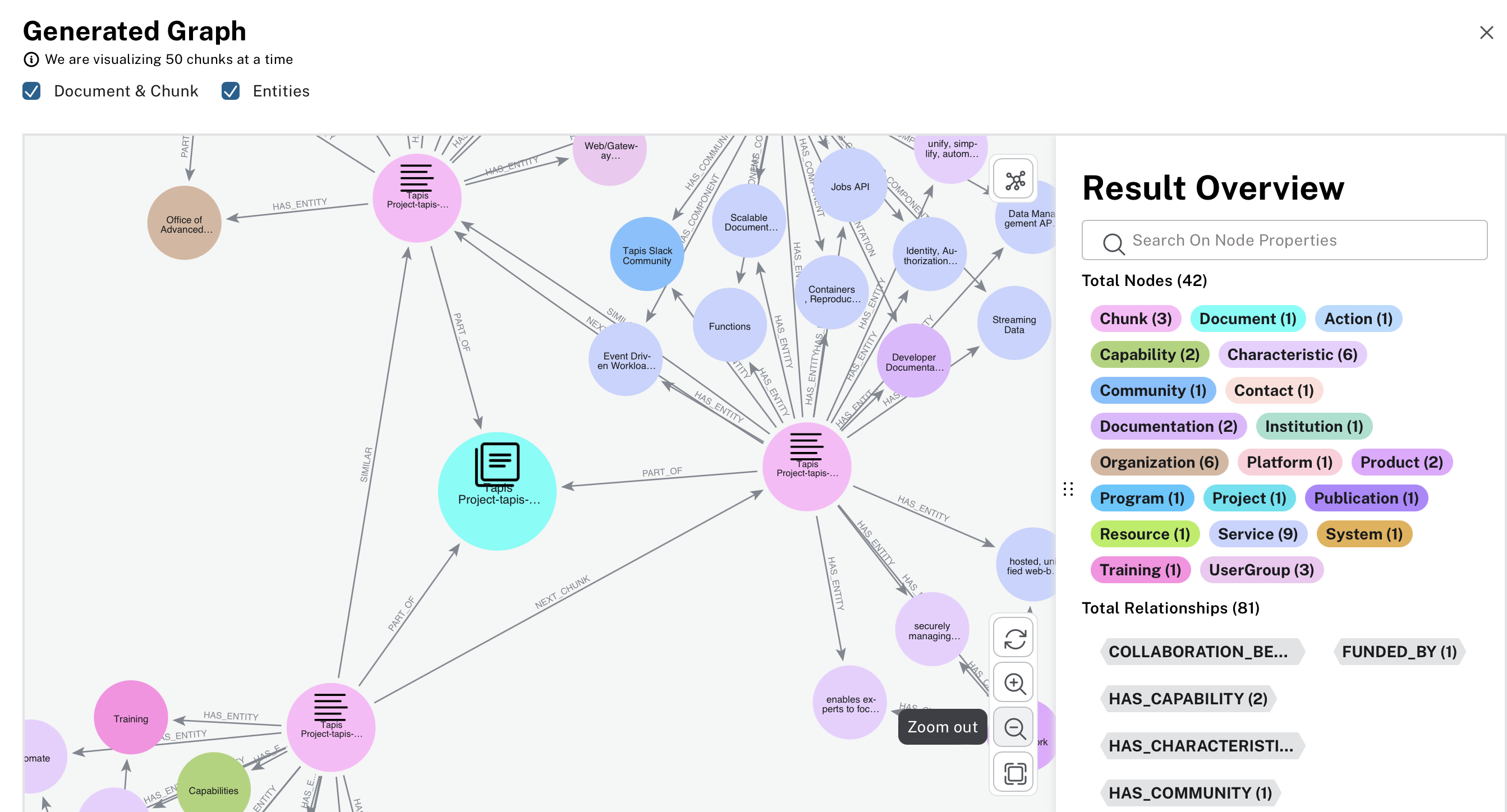
This knowledge graph is built using the Tapis readthedocs. There are several microservices with the Tapis framework that have relationships with each other.
Popular RAG Framework
The most popular framework that make building RAG applications super easy.
LangChain is a widely used framework for building RAG pipelines, chatbots, summarization tools, and more. It provides abstractions for document loading, splitting, embedding generation, vector store integration, retrievers, prompt templates, LLM wrappers, and chaining of operations. LangaChain can be integrated with OpenAI, Anthropic, Sambanova
!pip install langchain-sambanova
import getpass
import os

if not os.getenv("SAMBANOVA_API_KEY"):
    os.environ["SAMBANOVA_API_KEY"] = getpass.getpass("Enter your SambaNova API key: ")
import os
import openai

tapis_documents = [
    "Tapis is an NSF-funded web-based API framework for securely managing computational workloads across infrastructure and institutions, so that experts can focus on their research instead of the technology needed to accomplish it.",
    "As part of work funded by the National Science Foundation starting in 2019, Tapis is delivering a version 3 (“v3”) of its platform with several new capabilities, including a multi-site Security Kernel, Streaming Data APIs, and first-class support for containerized applications.",
    "Python code for generating a Tapis token: from tapipy.tapis import Tapis ..."
]
client = openai.OpenAI(
    api_key=os.environ.get("SAMBANOVA_API_KEY"),
    base_url="https://tejas.tacc.utexas.edu/v1/60709c21-409c-44a5-8a9d-1638fad5d5a6",
)

# Function to get a response for a user question
def ask_question_with_context(question: str, context_docs: list):
    # Combine all documents into a single context string
    context_text = "\n".join(context_docs)

    response = client.chat.completions.create(
        model='Meta-Llama-3.1-405B-Instruct',
        messages=[
            {"role": "system", "content": "You are a helpful assistant."},
            {"role": "user", "content": f"Use the following context to answer the question:\n\n{context_text}\n\nQuestion: {question}"}
        ],
        temperature=0.1,
        top_p=0.1
    )
    return response.choices[0].message.content

# Example: single user input
user_question = input("Enter your question: ")
answer = ask_question_with_context(user_question, tapis_documents)
print("\nAssistant:", answer)
Output ->
Enter your question:  what is Tapis?

Assistant: Tapis is a web-based API framework that securely manages computational workloads across different infrastructures and institutions, allowing researchers to focus on their work rather than the underlying technology. It is funded by the National Science Foundation (NSF).